
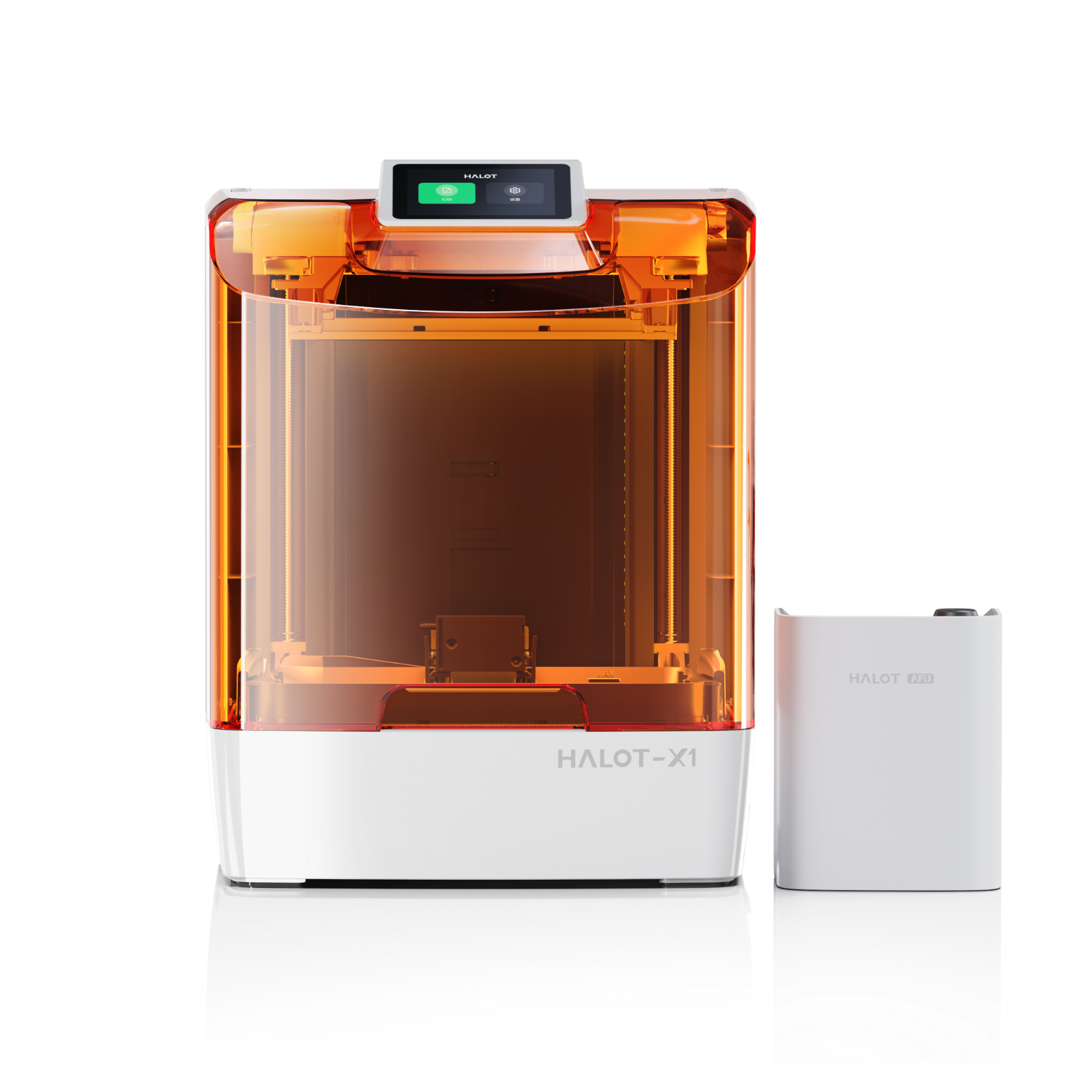


The Creality HALOT-X1 Combo is an advanced 16K resin 3D printing system that combines the HALOT-X1 MSLA printer with Creality’s intelligent AFU (Automatic Feed Unit) for automated resin management. Featuring a 10.1-inch 16K monochrome LCD, 92-zone intelligent exposure and a build volume of 211.68 × 118.37 × 200mm, this combo is designed for detailed miniature models, jewellery-style prototypes, intricate sculptures and professional design projects.
The Creality HALOT-X1 Combo 16K Resin 3D Printer delivers an LCD resolution of 15120 × 6230 pixels with a manufacturer-specified pixel size of 14 × 19 microns. This high-resolution exposure system helps reproduce fine textures, sharp edges and intricate model features when suitable resin profiles and printing conditions are used.
Its leveling-free design, innovative motion structure, quick-release components, Wi-Fi connectivity and included AFU resin management system help simplify resin printing workflows.
Available through NFIL3D India, the HALOT-X1 Combo is an option for designers, hobbyists, miniature makers and professionals looking for high-resolution resin printing with additional material-handling automation.
Why Choose Creality HALOT-X1 Combo?
The Creality HALOT-X1 Combo combines a high-resolution resin printer with an automated resin management accessory.
While many conventional MSLA printers require manual monitoring and resin refilling, the included AFU can automatically supply resin during compatible printing operations.
The HALOT-X1 also features a 92-zone intelligent exposure system that controls illumination according to the model’s exposure requirements.
Its distinctive motion system keeps the build platform stationary while moving the resin vat and light source through the printing process.
This design, together with its dual linear rail motion components, is intended to improve positioning stability.
The 16K LCD provides excellent potential for fine-detail reproduction, although finished-part accuracy still depends on resin selection, exposure settings, supports, geometry and post-processing.
Key Features and Benefits of Creality HALOT-X1 Combo
1. 10.1-Inch 16K Monochrome LCD
The Creality HALOT-X1 Combo features a 10.1-inch monochrome LCD with a resolution of 15120 × 6230 pixels.
The manufacturer specifies a 14 × 19µm pixel size, enabling fine exposure patterns and intricate model details.
This display makes the printer suitable for miniature characters, detailed sculptures, product presentation models and complex decorative parts.
However, pixel size should not be confused with guaranteed dimensional accuracy.
Resin shrinkage, orientation, exposure calibration and post-curing can affect the dimensions of the completed object.
2. 92-Zone Intelligent Exposure System
The HALOT-X1 uses a honeycomb matrix light source with 92-zone intelligent exposure.
Rather than treating the exposure area as a single fixed light region, the system can control illumination according to where curing is required.
Creality describes this approach as improving exposure efficiency and supporting consistent detailed printing.
The actual results depend on the resin profile, optical system condition and model design.
3. AFU Automatic Resin Feeding Unit Included
A defining feature of the Creality HALOT-X1 Combo is the included AFU resin management system.
The AFU can automatically supply resin when required during supported printing operations.
This helps reduce the need for manual refilling, particularly on longer print jobs.
The AFU also supports material monitoring and resin-handling functions.
Compatibility of resin bottles, tubing and automatic operating features should be checked against Creality’s current AFU documentation.
Automatic feeding does not remove the need for safe resin handling or appropriate supervision.
4. Smart Resin Monitoring and Material Management
The AFU is designed to support resin level and weight monitoring.
Its management features can help users understand the remaining material available during printing.
Compatible RFID resin systems can assist with material identification and parameter selection.
Not every third-party resin bottle supports these automatic identification functions.
When using third-party resin, users may need to configure exposure settings and material handling manually.
5. AFU Resin Heating Support
The Creality HALOT-X1 Combo includes resin management features intended to support temperature-controlled material handling.
The AFU supports resin heating, which can help prepare compatible materials for printing.
The appropriate temperature depends on the resin formulation.
Users should follow the resin manufacturer’s processing recommendations rather than assume that a single heating temperature is suitable for all materials.
6. Manufacturer-Advertised Speed up to 170mm/h
Creality advertises a maximum printing speed of 170mm per hour for the HALOT-X1 under suitable high-speed printing conditions.
This is a maximum advertised figure rather than a guaranteed speed for every model.
Actual printing time depends on layer height, exposure settings, lift and movement parameters, resin behaviour and model geometry.
Fine-detail projects may require different settings from maximum-speed printing.
For reliable results, prioritize a validated resin profile over the highest possible speed.
7. Large 211.68 × 118.37 × 200mm Build Volume
The Creality HALOT-X1 Combo provides a build volume of 211.68mm in length, 118.37mm in width and 200mm in height.
This allows users to print suitably sized individual models or arrange multiple smaller objects within the available area.
The build space is useful for tabletop miniatures, product prototypes, detailed sculptures and decorative components.
Correct orientation and support planning remain important for successful printing.
8. True Leveling-Free Design
The HALOT-X1 is designed with Creality’s leveling-free platform system.
This reduces the need for the conventional manual build-plate leveling process used on many resin printers.
Users should still follow installation, inspection and calibration instructions before printing.
Leveling-free does not mean that maintenance, setup checks or troubleshooting will never be required.
9. Innovative Motion Structure
Unlike many conventional resin printers, the HALOT-X1 uses a motion design in which the build platform remains stationary while the resin vat and optical assembly move.
Creality describes dual linear rails and lead screws that help stabilize this movement.
The structure is intended to support repeatable layer positioning and reduce unwanted motion.
Actual print quality remains dependent on proper setup and maintenance.
10. Quick-Release Build Platform and Resin Vat
The Creality HALOT-X1 Combo includes a quick-release build platform and a quick-release resin vat design.
These features can make certain cleaning, removal and maintenance tasks more convenient.
The build platform should only be released when the printer is in a safe state according to its instructions.
Wear suitable protective gloves when handling components contaminated with uncured resin.
11. Wi-Fi and USB Connectivity
The HALOT-X1 supports both Wi-Fi and USB file-transfer workflows.
Users can prepare models using supported slicing software and transfer compatible printing files to the machine.
Network-based printing functions depend on the installed software and firmware.
Confirm network compatibility and file-format requirements before beginning production work.
12. Touchscreen Control and Slicing Software
The HALOT-X1 includes a manufacturer-listed 3.98-inch capacitive touchscreen.
The printer supports compatible slicing workflows using HALOT BOX and CHITUBOX software.
Users can prepare model orientation, support structures, layer height and exposure settings before printing.
Available software functions may vary by version and license.
Applications of Creality HALOT-X1 Combo
Miniatures and Tabletop Figurines
The Creality HALOT-X1 Combo is suitable for printing detailed character miniatures, collectible figurines and tabletop accessories.
Its fine pixel size can help reproduce small textures and decorative features.
Jewellery Masters and Design Prototypes
Create jewellery-style models, intricate ornaments and prototype patterns.
For investment casting, use an appropriate castable resin and a validated casting workflow.
Architectural Models
Produce detailed architectural components, miniature structures and model-building decorations.
Product Design and Prototyping
The HALOT-X1 can create appearance prototypes, design mock-ups and small intricate parts.
Material strength and temperature resistance depend on the selected resin.
Detailed Artistic Sculptures
Create decorative sculptures, busts, display objects and highly detailed artistic models.
Engineering Demonstration Parts
Print suitable mechanical appearance prototypes, fit-check components and technical display models.
For demanding functional use, verify the selected resin’s mechanical and thermal properties.
Dental Model Prototyping
The printer may be used for suitable non-clinical dental-style demonstration models.
Any clinical or patient-contact application requires appropriate certified materials, equipment validation and regulatory compliance.
Educational and Research Projects
The Creality HALOT-X1 Combo can support advanced printing demonstrations and supervised technical projects in properly equipped facilities.
Creality HALOT-X1 Combo Technical Specifications
| Specification | Details |
|---|---|
| Product Name | Creality HALOT-X1 Combo 16K Resin 3D Printer |
| Brand | Creality |
| Model | HALOT-X1 Combo |
| Printing Technology | LCD / MSLA Resin Printing |
| LCD Screen | 10.1-Inch 16K Monochrome |
| LCD Resolution | 15120 × 6230 Pixels |
| Pixel Size | 14 × 19µm |
| Build Volume | 211.68 × 118.37 × 200mm |
| Light Source | Honeycomb Matrix Light Source |
| Exposure System | 92-Zone Intelligent Exposure |
| Compatible Resin Wavelength | 405nm |
| Maximum Advertised Print Speed | Up to 170mm/h |
| Layer Thickness | 0.01–0.20mm |
| Z-Axis Positioning Accuracy | 0.01mm, manufacturer specification |
| Build Platform | Leveling-Free, Quick-Release |
| Resin Vat | Quick-Release Design |
| AFU Automatic Feed Unit | Included in Combo |
| AFU Functions | Automatic Feeding, Monitoring, Heating, Compatible RFID Support |
| Touchscreen | 3.98-Inch Capacitive |
| Slicing Software | HALOT BOX / CHITUBOX |
| Connectivity | Wi-Fi and USB |
| Machine Dimensions | 344 × 331 × 434mm |
| Printer Net Weight | 12.93kg, manufacturer specification |
| Rated Power | 350W |
| Voltage | Follow regional configuration and machine label |
Technical specifications describe the HALOT-X1 printer unless otherwise stated. Combo shipping dimensions and total packed weight may differ because the AFU is included.
How to Use Creality HALOT-X1 Combo
Step 1: Prepare a Safe Workspace
Place the printer on a stable surface in a well-ventilated workspace.
Wear the personal protective equipment recommended by the resin manufacturer.
Avoid handling uncured resin with bare hands.
Step 2: Install the Printer and AFU
Follow Creality’s official HALOT-X1 Combo installation guide.
Connect the AFU components and compatible resin supply according to the manufacturer’s instructions.
Check the tubing, connections and resin container before operation.
Step 3: Select Suitable Resin
Choose a 405nm UV-curing resin compatible with the printer and intended application.
Check whether the resin container supports the AFU’s automatic functions.
Third-party resin may require manual settings or additional compatibility checks.
Step 4: Prepare and Slice the Model
Use compatible slicing software to import the model.
Select the correct resin profile, layer thickness, exposure settings and supports.
Orient the model to reduce excessive separation forces and unwanted suction.
Step 5: Inspect the Printer
Check that the resin vat, release film and build platform are clean and correctly installed.
Inspect the AFU feeding system before beginning the print.
Step 6: Start Printing
Transfer a compatible sliced file using Wi-Fi or USB.
Begin the printing job using the appropriate printer interface.
The AFU can automatically manage resin feeding during supported operations.
Do not assume that automatic resin feeding eliminates the need for monitoring.
Step 7: Remove the Printed Model
Once the print completes, follow the printer’s safe removal procedure.
Use suitable chemical-resistant gloves and handling tools.
Avoid spilling uncured resin onto the printer or surrounding surfaces.
Step 8: Wash and Post-Cure
Clean the model using the washing method specified for the resin.
Then complete the recommended UV post-curing process.
Washing and post-curing are important for achieving the intended finished-part characteristics.
Step 9: Maintain the Printer and AFU
Clean and maintain the resin-handling components according to the official instructions.
Inspect the resin vat and release film regularly.
Dispose of uncured resin and contaminated liquids according to local requirements and resin safety documentation.
Never pour uncured resin into ordinary drains.
Tips for Better HALOT-X1 Combo Prints
Use a resin profile validated for the chosen material.
Start with a small calibration print before large projects.
Do not assume the maximum 170mm/h speed applies to every resin.
Use suitable support structures for delicate features.
Inspect hollow models for appropriate drainage.
Maintain the resin vat and release film.
Keep the AFU feeding components clean and correctly connected.
Check resin availability before beginning long jobs.
Use the correct heating settings for the chosen material.
Do not rely on automated resin feeding as a substitute for ventilation or safe supervision.
Wash and post-cure finished models according to the resin manufacturer’s instructions.
Frequently Asked Questions About Creality HALOT-X1 Combo
What is Creality HALOT-X1 Combo?
The Creality HALOT-X1 Combo combines the HALOT-X1 16K MSLA resin printer with an AFU automatic resin management system.
What is the LCD resolution?
The printer uses a 15120 × 6230 pixel monochrome LCD.
What is the screen size?
The printing LCD measures 10.1 inches.
What is the build volume?
The build volume is 211.68 × 118.37 × 200mm.
Is the AFU included with the Combo?
Yes. The Combo configuration includes the AFU automatic resin feeding unit.
Does AFU support resin heating?
Yes. It supports resin heating and other material management functions. Use settings appropriate for the selected resin.
Does the printer require manual leveling?
Creality advertises a leveling-free build platform design. Users must still follow installation and maintenance instructions.
Can the printer reach 170mm/h?
Creality advertises up to 170mm/h with suitable high-speed printing conditions. Actual speed varies.
Can I use third-party resin?
Compatible third-party 405nm resin may be usable, but automatic RFID features and bottle compatibility may vary.
What is 92-zone intelligent exposure?
It is Creality’s controlled light exposure system that manages illumination across 92 exposure zones.
Is this printer suitable for miniatures?
Yes. The high-resolution screen makes it suitable for detailed miniature models and figurines.
Does resin printing require post-processing?
Yes. Resin prints generally require washing and UV post-curing using appropriate methods.
Buy Creality HALOT-X1 Combo from NFIL3D
The Creality HALOT-X1 Combo combines a high-resolution 16K resin printer with intelligent resin feeding and management.
With a 10.1-inch LCD, 92-zone exposure system, 211.68 × 118.37 × 200mm build volume and included AFU, it is designed for detailed model making and efficient resin printing workflows.
Explore the NFIL3D 3D Printer Collection to compare resin and FDM printers.
For complete specifications, visit the Official Creality HALOT-X1 Product Page.
For installation, resin management and maintenance guidance, read the Creality HALOT-X1 User Guide.
Shop the HALOT-X1 Combo and other 3D printing products at NFIL3D.


Reviews
There are no reviews yet.